|
導(dǎo)讀微信小程序,簡稱小程序,英文名Mini Program,是一種不需要下載安裝即可使用的應(yīng)用,它實現(xiàn)了應(yīng)用“觸手可及”的夢想,用戶掃一掃或搜一下即可打開應(yīng)用。小程序是一種不用下載就能使用的應(yīng)用,也是一... 微信小程序,簡稱小程序,英文名Mini Program,是一種不需要下載安裝即可使用的應(yīng)用,它實現(xiàn)了應(yīng)用“觸手可及”的夢想,用戶掃一掃或搜一下即可打開應(yīng)用。小程序是一種不用下載就能使用的應(yīng)用,也是一項門檻非常高的創(chuàng)新,經(jīng)過將近兩年的發(fā)展,已經(jīng)構(gòu)造了新的小程序開發(fā)環(huán)境和開發(fā)者生態(tài)。 這篇文章主要介紹了微信小程序上傳圖片到服務(wù)器的實例代碼,在文章給大家補充介紹了微信小程序上傳一或多張圖片
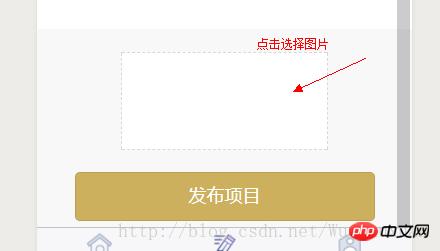
的方法,本文給大家介紹的非常詳細,具有參考借鑒加載,需要的朋友可以參考下上傳圖片到服務(wù)器: 1.先在前端寫一個選擇圖片的區(qū)域來觸發(fā)wx.chooseImage接口并用wx.setStorage接口把圖片路徑存起來。
-wxml
 <view class="shangchuan" bindtap="choose">
  <image style="width:100%;height:100%;" src="{{tempFilePaths}}"></image>
 </view>
 <button formType='submit' class="fabu">發(fā)布項目</button>
 /**選擇圖片 */
 choose: function () {
  var that = this
  wx.chooseImage({
   count: 1,
   sizeType: ['original', 'compressed'], // 可以指定是原圖還是壓縮圖,默認二者都有
   sourceType: ['album', 'camera'], // 可以指定來源是相冊還是相機,默認二者都有
   success: function (res) {
    var tempFilePaths = res.tempFilePaths
    that.setData({
     tempFilePaths: res.tempFilePaths
    })
    console.log(res.tempFilePaths)
    wx.setStorage({ key: "card", data: tempFilePaths[0] })
   }
  })
 },
2.使用wx.uploadFile將剛才上傳的圖片上傳到服務(wù)器上
 formSubmit2: function (e) {
    var that = this
    var card = wx.getStorageSync('card')
    wx.uploadFile({
     url: app.globalData.create_funds,
     filePath: card,
     name: 'card',
     formData: {
      'user_id': app.globalData.user_id,
      'person': e.detail.value.person,
      'company': e.detail.value.company,
     },
     success: function (res) {
      console.log(res)
     }
    })
   }
  }
 },
PS: 微信小程序上傳一或多張圖片 一.要點 1.選取圖片 wx.chooseImage({
sizeType: [], // original 原圖,compressed 壓縮圖,默認二者都有
sourceType: [], // album 從相冊選圖,camera 使用相機,默認二者都有
success: function (res) {
console.log(res);
var array = res.tempFilePaths, //圖片的本地文件路徑列表
}
})2.上傳圖片 wx.uploadFile({
url: '', //開發(fā)者服務(wù)器的 url
filePath: '', // 要上傳文件資源的路徑 String類型!!!
name: 'uploadFile', // 文件對應(yīng)的 key ,(后臺接口規(guī)定的關(guān)于圖片的請求參數(shù))
header: {
'content-type': 'multipart/form-data'
}, // 設(shè)置請求的 header
formData: { }, // HTTP 請求中其他額外的參數(shù)
success: function (res) {
},
fail: function (res) {
}
})二.代碼示例 // 點擊上傳圖片
upShopLogo: function () {
var that = this;
wx.showActionSheet({
itemList: ['從相冊中選擇', '拍照'],
itemColor: "#f7982a",
success: function (res) {
if (!res.cancel) {
if (res.tapIndex == 0) {
that.chooseWxImageShop('album')
} else if (res.tapIndex == 1) {
that.chooseWxImageShop('camera')
}
}
}
})
},
chooseWxImageShop: function (type) {
var that = this;
wx.chooseImage({
sizeType: ['original', 'compressed'],
sourceType: [type],
success: function (res) {
/*上傳單張
that.data.orderDetail.shopImage = res.tempFilePaths[0],
that.upload_file(API_URL + 'shop/shopIcon', res.tempFilePaths[0])
*/
/*上傳多張(遍歷數(shù)組,一次傳一張)
for (var index in res.tempFilePaths) {
that.upload_file(API_URL + 'shop/shopImage', res.tempFilePaths[index])
}
*/
}
})
},
upload_file: function (url, filePath) {
var that = this;
wx.uploadFile({
url: url,
filePath: filePath,
name: 'uploadFile',
header: {
'content-type': 'multipart/form-data'
}, // 設(shè)置請求的 header
formData: { 'shopId': wx.getStorageSync('shopId') }, // HTTP 請求中其他額外的 form data
success: function (res) {
wx.showToast({
title: "圖片修改成功",
icon: 'success',
duration: 700
})
},
fail: function (res) {
}
})
},以上就是本文的全部內(nèi)容,希望對大家的學(xué)習(xí)有所幫助,更多相關(guān)內(nèi)容請關(guān)注PHP中文網(wǎng)! 相關(guān)推薦 微信小程序?qū)崿F(xiàn)點擊按鈕修改字體顏色的功能 微信小程序之獲取當(dāng)前位置經(jīng)緯度以及地圖顯示 以上就是關(guān)于微信小程序上傳圖片到服務(wù)器的代碼的詳細內(nèi)容,更多請關(guān)注php中文網(wǎng)其它相關(guān)文章! 小程序是一種不需要下載安裝即可使用的應(yīng)用,它實現(xiàn)了應(yīng)用“觸手可及”的夢想,用戶掃一掃或者搜一下即可打開應(yīng)用。 |
溫馨提示:喜歡本站的話,請收藏一下本站!
本站發(fā)布的Win7純凈版系統(tǒng)、Win10純凈版和XP純凈版系統(tǒng)僅為個人學(xué)習(xí)測試使用,請在下載后24小時內(nèi)刪除,不得用于任何商業(yè)用途,否則后果自負,請支持購買微軟正版軟件!
本站所有資源全部來自于網(wǎng)絡(luò)資源,如侵犯到您的權(quán)益,請及時通知我們(peng896066052@126.com),我們會及時處理.
Copyright © 2018-2020 雨林木風(fēng)下載站