|
導讀微信小程序,簡稱小程序,英文名Mini Program,是一種不需要下載安裝即可使用的應用,它實現了應用“觸手可及”的夢想,用戶掃一掃或搜一下即可打開應用。小程序是一種不用下載就能使用的應用,也是一... 微信小程序,簡稱小程序,英文名Mini Program,是一種不需要下載安裝即可使用的應用,它實現了應用“觸手可及”的夢想,用戶掃一掃或搜一下即可打開應用。小程序是一種不用下載就能使用的應用,也是一項門檻非常高的創新,經過將近兩年的發展,已經構造了新的小程序開發環境和開發者生態。 在實際的移動應用程序交互方式中,最常見的就是滑動操作。像左右滑動切換頁面,手指張開來放大圖片等,都是由滑動操作來完成的。微信小程序默認提供的相關事件如下:
觸摸相關操作事件 tap對應點擊操作,還提供了longtap來支持長按操作,這些都比較簡單,就不多做講述。 //wxml
<view id="id" bindtouchmove="handletouchmove" style = "width : 100px; height : 100px; background : #167567;">
</view>
//js
Page({
handletouchmove: function(event) {
console.log(event)
},
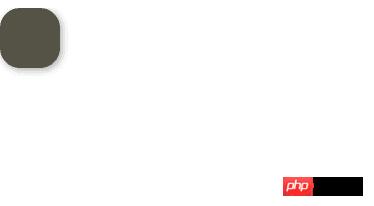
})當按住 拖拽操作通過監聽滑動事件,可以實現一些實用的功能,比如用過iphone的用戶都知道assistivetouch,一個桌面上的快捷按鈕,可以將按鈕拖動到桌面的任意位置。為了方便,這里就用一個圓形來代表該按鈕。 //wxml
<view id="id" class = "ball" bindtouchmove="handletouchmove" style = "width : 60px; height : 60px; background : #545345;">
</view>
//wxss
.ball {
box-shadow:2px 2px 10px #AAA;
border-radius: 20px;
position: absolute;
}
//js
Page({
handletouchmove: function(event) {
console.log(event)
},
})
視圖跟隨
在Page中定義按鈕的位置數據ballBottom和ballRight,并綁定到view的對應屬性中。 //wxml
<view id="id" class = "ball" bindtouchmove="handletouchmove" style = "width : 60px; height : 60px; background : #545345; top:{{ballTop}}px; left: {{ballLeft}}px">
</view>
//js
Page({
data: {
ballTop: 0,
ballLeft: 0,
},
handletouchmove: function(event) {
console.log(event)
},
})接下來在 handletouchmove: function(event) {
console.log(event)
this.setData ({
ballTop: event.touches[0].pageY,
ballLeft: event.touches[0].pageX,
});
},運行發現基本可以實現效果,不過有兩個問題,一是會將按鈕拖出屏幕邊緣,二是按鈕始終在鼠標右下方。 Page({
data: {
ballTop: 0,
ballLeft: 0,
screenHeight:0,
screenWidth:0
},
onLoad: function () {
//獲取屏幕寬高
var _this = this;
wx.getSystemInfo({
success: function (res) {
_this.setData({
screenHeight: res.windowHeight,
screenWidth: res.windowWidth,
});
}
});
},
handletouchmove: function(event) {
console.log(event)
let pageX = event.touches[0].pageX;
let pageY = event.touches[0].pageY;
//屏幕邊界判斷
if (pageX < 30 || pageY < 30)
return;
if (pageX > this.data.screenWidth - 30)
return;
if (pageY > this.data.screenHeight - 30)
return;
this.setData ({
ballTop: event.touches[0].pageY - 30,
ballLeft: event.touches[0].pageX - 30,
});
},
})再次運行,一切ok。 手勢識別通過處理滑動操作可以識別各種手勢操作,如左右滑動等。思路也很簡單,通過綁定touchstart和touchmove事件,然后對坐標信息進行識別計算即可(如current.PageX - last.PageX < 0則認為是向左滑動) //wxml
<view id="id" class = "ball" bindtap = "handletap" bindtouchstart = "handletouchtart" bindtouchmove="handletouchmove" style = "width : 100%px; height : 40px;">
{{text}}
</view>
//js
Page({
data: {
lastX: 0,
lastY: 0,
text : "沒有滑動",
},
handletouchmove: function(event) {
console.log(event)
let currentX = event.touches[0].pageX
let currentY = event.touches[0].pageY
console.log(currentX)
console.log(this.data.lastX)
let text = ""
if ((currentX - this.data.lastX) < 0)
text = "向左滑動"
else if (((currentX - this.data.lastX) > 0))
text = "向右滑動"
//將當前坐標進行保存以進行下一次計算
this.data.lastX = currentX
this.data.lastY = currentY
this.setData({
text : text,
});
},
handletouchtart:function(event) {
console.log(event)
this.data.lastX = event.touches[0].pageX
this.data.lastY = event.touches[0].pageY
},
handletap:function(event) {
console.log(event)
},
})運行程序,當向左滑動時會 同時識別左右滑動和上下互動 handletouchmove: function(event) {
console.log(event)
let currentX = event.touches[0].pageX
let currentY = event.touches[0].pageY
let tx = currentX - this.data.lastX
let ty = currentY - this.data.lastY
let text = ""
//左右方向滑動
if (Math.abs(tx) > Math.abs(ty)) {
if (tx < 0)
text = "向左滑動"
else if (tx > 0)
text = "向右滑動"
}
//上下方向滑動
else {
if (ty < 0)
text = "向上滑動"
else if (ty > 0)
text = "向下滑動"
}
//將當前坐標進行保存以進行下一次計算
this.data.lastX = currentX
this.data.lastY = currentY
this.setData({
text : text,
});
},在實際應用中,當某種手勢被觸發后,在用戶沒有放開鼠標或手指前,會一直識別為該手勢。比如當用戶觸發左滑手勢后,這時再向下滑動,仍要按照左滑手勢來處理。 Page({
data: {
lastX: 0,
lastY: 0,
text : "沒有滑動",
currentGesture: 0,
},
handletouchmove: function(event) {
console.log(event)
if (this.data.currentGesture != 0){
return
}
let currentX = event.touches[0].pageX
let currentY = event.touches[0].pageY
let tx = currentX - this.data.lastX
let ty = currentY - this.data.lastY
let text = ""
//左右方向滑動
if (Math.abs(tx) > Math.abs(ty)) {
if (tx < 0) {
text = "向左滑動"
this.data.currentGesture = 1
}
else if (tx > 0) {
text = "向右滑動"
this.data.currentGesture = 2
}
}
//上下方向滑動
else {
if (ty < 0){
text = "向上滑動"
this.data.currentGesture = 3
}
else if (ty > 0) {
text = "向下滑動"
this.data.currentGesture = 4
}
}
//將當前坐標進行保存以進行下一次計算
this.data.lastX = currentX
this.data.lastY = currentY
this.setData({
text : text,
});
},
handletouchtart:function(event) {
console.log(event)
this.data.lastX = event.touches[0].pageX
this.data.lastY = event.touches[0].pageY
},
handletouchend:function(event) {
console.log(event)
this.data.currentGesture = 0
this.setData({
text : "沒有滑動",
});
},
})多點觸控 以上就是小程序開發之基礎篇滑動操作(10)的詳細內容,更多請關注php中文網其它相關文章! 小程序是一種不需要下載安裝即可使用的應用,它實現了應用“觸手可及”的夢想,用戶掃一掃或者搜一下即可打開應用。 |
溫馨提示:喜歡本站的話,請收藏一下本站!
本站發布的Win7純凈版系統、Win10純凈版和XP純凈版系統僅為個人學習測試使用,請在下載后24小時內刪除,不得用于任何商業用途,否則后果自負,請支持購買微軟正版軟件!
本站所有資源全部來自于網絡資源,如侵犯到您的權益,請及時通知我們(peng896066052@126.com),我們會及時處理.
Copyright © 2018-2020 雨林木風下載站