|
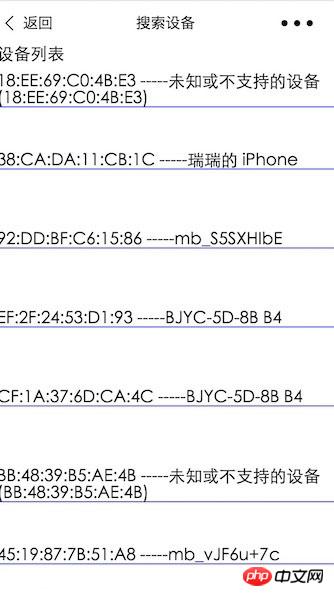
導(dǎo)讀微信小程序,簡(jiǎn)稱小程序,英文名Mini Program,是一種不需要下載安裝即可使用的應(yīng)用,它實(shí)現(xiàn)了應(yīng)用“觸手可及”的夢(mèng)想,用戶掃一掃或搜一下即可打開應(yīng)用。小程序是一種不用下載就能使用的應(yīng)用,也是一... 微信小程序,簡(jiǎn)稱小程序,英文名Mini Program,是一種不需要下載安裝即可使用的應(yīng)用,它實(shí)現(xiàn)了應(yīng)用“觸手可及”的夢(mèng)想,用戶掃一掃或搜一下即可打開應(yīng)用。小程序是一種不用下載就能使用的應(yīng)用,也是一項(xiàng)門檻非常高的創(chuàng)新,經(jīng)過將近兩年的發(fā)展,已經(jīng)構(gòu)造了新的小程序開發(fā)環(huán)境和開發(fā)者生態(tài)。 本文主要介紹了微信小程序--Ble藍(lán)牙的實(shí)現(xiàn)方法。文中附上源碼下載,具有很好的參考價(jià)值。下面跟著小編一起來看下吧有一段時(shí)間沒有。沒有寫關(guān)于小程序的文章了。3月28日,微信的api又一次新的更新。期待已久的藍(lán)牙api更新。就開始擼一番。 源碼地址 1.簡(jiǎn)述 藍(lán)牙適配器接口是基礎(chǔ)庫(kù)版本 1.1.0 開始支持。 iOS 微信客戶端 6.5.6 版本開始支持,Android 客戶端暫不支持 藍(lán)牙總共增加了18個(gè)api接口。 2.Api分類 搜索類 連接類 通信類 3.API的具體使用 詳細(xì)見官網(wǎng): https://mp.weixin.qq.com/debug/wxadoc/dev/api/bluetooth.html#wxgetconnectedbluethoothdevicesobject 4. 案例實(shí)現(xiàn) 4.1 搜索藍(lán)牙設(shè)備 /**
* 搜索設(shè)備界面
*/
Page({
data: {
logs: [],
list:[],
},
onLoad: function () {
console.log('onLoad')
var that = this;
// const SDKVersion = wx.getSystemInfoSync().SDKVersion || '1.0.0'
// const [MAJOR, MINOR, PATCH] = SDKVersion.split('.').map(Number)
// console.log(SDKVersion);
// console.log(MAJOR);
// console.log(MINOR);
// console.log(PATCH);
// const canIUse = apiName => {
// if (apiName === 'showModal.cancel') {
// return MAJOR >= 1 && MINOR >= 1
// }
// return true
// }
// wx.showModal({
// success: function(res) {
// if (canIUse('showModal.cancel')) {
// console.log(res.cancel)
// }
// }
// })
//獲取適配器
wx.openBluetoothAdapter({
success: function(res){
// success
console.log("-----success----------");
console.log(res);
//開始搜索
wx.startBluetoothDevicesDiscovery({
services: [],
success: function(res){
// success
console.log("-----startBluetoothDevicesDiscovery--success----------");
console.log(res);
},
fail: function(res) {
// fail
console.log(res);
},
complete: function(res) {
// complete
console.log(res);
}
})
},
fail: function(res) {
console.log("-----fail----------");
// fail
console.log(res);
},
complete: function(res) {
// complete
console.log("-----complete----------");
console.log(res);
}
})
wx.getBluetoothDevices({
success: function(res){
// success
//{devices: Array[11], errMsg: "getBluetoothDevices:ok"}
console.log("getBluetoothDevices");
console.log(res);
that.setData({
list:res.devices
});
console.log(that.data.list);
},
fail: function(res) {
// fail
},
complete: function(res) {
// complete
}
})
},
onShow:function(){
},
//點(diǎn)擊事件處理
bindViewTap: function(e) {
console.log(e.currentTarget.dataset.title);
console.log(e.currentTarget.dataset.name);
console.log(e.currentTarget.dataset.advertisData);
var title = e.currentTarget.dataset.title;
var name = e.currentTarget.dataset.name;
wx.redirectTo({
url: '../conn/conn?deviceId='+title+'&name='+name,
success: function(res){
// success
},
fail: function(res) {
// fail
},
complete: function(res) {
// complete
}
})
},
})4.2連接 獲取數(shù)據(jù) /**
* 連接設(shè)備。獲取數(shù)據(jù)
*/
Page({
data: {
motto: 'Hello World',
userInfo: {},
deviceId: '',
name: '',
serviceId: '',
services: [],
cd20: '',
cd01: '',
cd02: '',
cd03: '',
cd04: '',
characteristics20: null,
characteristics01: null,
characteristics02: null,
characteristics03: null,
characteristics04: null,
result,
},
onLoad: function (opt) {
var that = this;
console.log("onLoad");
console.log('deviceId=' + opt.deviceId);
console.log('name=' + opt.name);
that.setData({ deviceId: opt.deviceId });
/**
* 監(jiān)聽設(shè)備的連接狀態(tài)
*/
wx.onBLEConnectionStateChanged(function (res) {
console.log(`device ${res.deviceId} state has changed, connected: ${res.connected}`)
})
/**
* 連接設(shè)備
*/
wx.createBLEConnection({
deviceId: that.data.deviceId,
success: function (res) {
// success
console.log(res);
/**
* 連接成功,后開始獲取設(shè)備的服務(wù)列表
*/
wx.getBLEDeviceServices({
// 這里的 deviceId 需要在上面的 getBluetoothDevices中獲取
deviceId: that.data.deviceId,
success: function (res) {
console.log('device services:', res.services)
that.setData({ services: res.services });
console.log('device services:', that.data.services[1].uuid);
that.setData({ serviceId: that.data.services[1].uuid });
console.log('--------------------------------------');
console.log('device設(shè)備的id:', that.data.deviceId);
console.log('device設(shè)備的服務(wù)id:', that.data.serviceId);
/**
* 延遲3秒,根據(jù)服務(wù)獲取特征
*/
setTimeout(function () {
wx.getBLEDeviceCharacteristics({
// 這里的 deviceId 需要在上面的 getBluetoothDevices
deviceId: that.data.deviceId,
// 這里的 serviceId 需要在上面的 getBLEDeviceServices 接口中獲取
serviceId: that.data.serviceId,
success: function (res) {
console.log('000000000000' + that.data.serviceId);
console.log('device getBLEDeviceCharacteristics:', res.characteristics)
for (var i = 0; i < 5; i++) {
if (res.characteristics[i].uuid.indexOf("cd20") != -1) {
that.setData({
cd20: res.characteristics[i].uuid,
characteristics20: res.characteristics[i]
});
}
if (res.characteristics[i].uuid.indexOf("cd01") != -1) {
that.setData({
cd01: res.characteristics[i].uuid,
characteristics01: res.characteristics[i]
});
}
if (res.characteristics[i].uuid.indexOf("cd02") != -1) {
that.setData({
cd02: res.characteristics[i].uuid,
characteristics02: res.characteristics[i]
});
} if (res.characteristics[i].uuid.indexOf("cd03") != -1) {
that.setData({
cd03: res.characteristics[i].uuid,
characteristics03: res.characteristics[i]
});
}
if (res.characteristics[i].uuid.indexOf("cd04") != -1) {
that.setData({
cd04: res.characteristics[i].uuid,
characteristics04: res.characteristics[i]
});
}
}
console.log('cd01= ' + that.data.cd01 + 'cd02= ' + that.data.cd02 + 'cd03= ' + that.data.cd03 + 'cd04= ' + that.data.cd04 + 'cd20= ' + that.data.cd20);
/**
* 回調(diào)獲取 設(shè)備發(fā)過來的數(shù)據(jù)
*/
wx.onBLECharacteristicValueChange(function (characteristic) {
console.log('characteristic value comed:', characteristic.value)
//{value: ArrayBuffer, deviceId: "D8:00:D2:4F:24:17", serviceId: "ba11f08c-5f14-0b0d-1080-007cbe238851-0x600000460240", characteristicId: "0000cd04-0000-1000-8000-00805f9b34fb-0x60800069fb80"}
/**
* 監(jiān)聽cd04cd04中的結(jié)果
*/
if (characteristic.characteristicId.indexOf("cd01") != -1) {
const result = characteristic.value;
const hex = that.buf2hex(result);
console.log(hex);
}
if (characteristic.characteristicId.indexOf("cd04") != -1) {
const result = characteristic.value;
const hex = that.buf2hex(result);
console.log(hex);
that.setData({ result: hex });
}
})
/**
* 順序開發(fā)設(shè)備特征notifiy
*/
wx.notifyBLECharacteristicValueChanged({
deviceId: that.data.deviceId,
serviceId: that.data.serviceId,
characteristicId: that.data.cd01,
state: true,
success: function (res) {
// success
console.log('notifyBLECharacteristicValueChanged success', res);
},
fail: function (res) {
// fail
},
complete: function (res) {
// complete
}
})
wx.notifyBLECharacteristicValueChanged({
deviceId: that.data.deviceId,
serviceId: that.data.serviceId,
characteristicId: that.data.cd02,
state: true,
success: function (res) {
// success
console.log('notifyBLECharacteristicValueChanged success', res);
},
fail: function (res) {
// fail
},
complete: function (res) {
// complete
}
})
wx.notifyBLECharacteristicValueChanged({
deviceId: that.data.deviceId,
serviceId: that.data.serviceId,
characteristicId: that.data.cd03,
state: true,
success: function (res) {
// success
console.log('notifyBLECharacteristicValueChanged success', res);
},
fail: function (res) {
// fail
},
complete: function (res) {
// complete
}
})
wx.notifyBLECharacteristicValueChanged({
// 啟用 notify 功能
// 這里的 deviceId 需要在上面的 getBluetoothDevices 或 onBluetoothDeviceFound 接口中獲取
deviceId: that.data.deviceId,
serviceId: that.data.serviceId,
characteristicId: that.data.cd04,
state: true,
success: function (res) {
console.log('notifyBLECharacteristicValueChanged success', res)
}
})
}, fail: function (res) {
console.log(res);
}
})
}
, 1500);
}
})
},
fail: function (res) {
// fail
},
complete: function (res) {
// complete
}
})
},
/**
* 發(fā)送 數(shù)據(jù)到設(shè)備中
*/
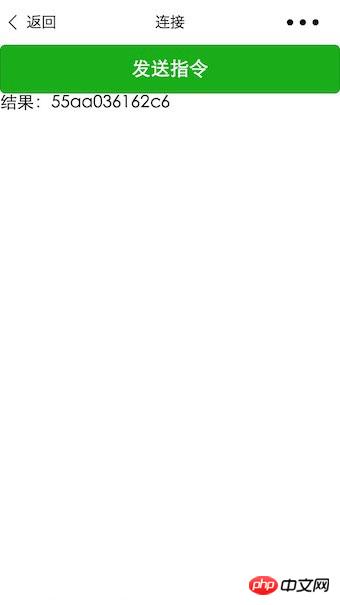
bindViewTap: function () {
var that = this;
var hex = 'AA5504B10000B5'
var typedArray = new Uint8Array(hex.match(/[\da-f]{2}/gi).map(function (h) {
return parseInt(h, 16)
}))
console.log(typedArray)
console.log([0xAA, 0x55, 0x04, 0xB1, 0x00, 0x00, 0xB5])
var buffer1 = typedArray.buffer
console.log(buffer1)
wx.writeBLECharacteristicValue({
deviceId: that.data.deviceId,
serviceId: that.data.serviceId,
characteristicId: that.data.cd20,
value: buffer1,
success: function (res) {
// success
console.log("success 指令發(fā)送成功");
console.log(res);
},
fail: function (res) {
// fail
console.log(res);
},
complete: function (res) {
// complete
}
})
},
/**
* ArrayBuffer 轉(zhuǎn)換為 Hex
*/
buf2hex: function (buffer) { // buffer is an ArrayBuffer
return Array.prototype.map.call(new Uint8Array(buffer), x => ('00' + x.toString(16)).slice(-2)).join('');
}
})5.效果展示
發(fā)送校驗(yàn)指令。獲取結(jié)果
以上就是微信小程序--Ble藍(lán)牙的詳細(xì)內(nèi)容,更多請(qǐng)關(guān)注php中文網(wǎng)其它相關(guān)文章! 小程序是一種不需要下載安裝即可使用的應(yīng)用,它實(shí)現(xiàn)了應(yīng)用“觸手可及”的夢(mèng)想,用戶掃一掃或者搜一下即可打開應(yīng)用。 |
溫馨提示:喜歡本站的話,請(qǐng)收藏一下本站!
本站發(fā)布的Win7純凈版系統(tǒng)、Win10純凈版和XP純凈版系統(tǒng)僅為個(gè)人學(xué)習(xí)測(cè)試使用,請(qǐng)?jiān)谙螺d后24小時(shí)內(nèi)刪除,不得用于任何商業(yè)用途,否則后果自負(fù),請(qǐng)支持購(gòu)買微軟正版軟件!
本站所有資源全部來自于網(wǎng)絡(luò)資源,如侵犯到您的權(quán)益,請(qǐng)及時(shí)通知我們(peng896066052@126.com),我們會(huì)及時(shí)處理.
Copyright © 2018-2020 雨林木風(fēng)下載站