|
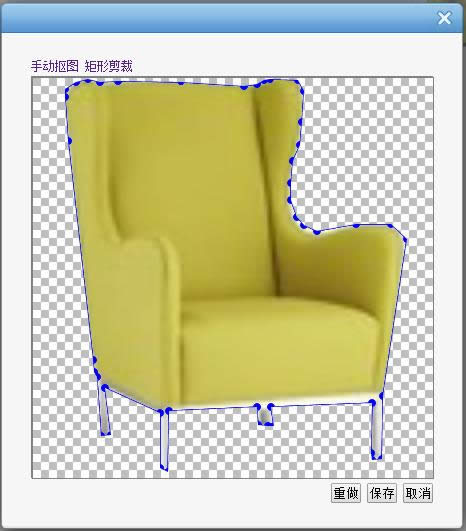
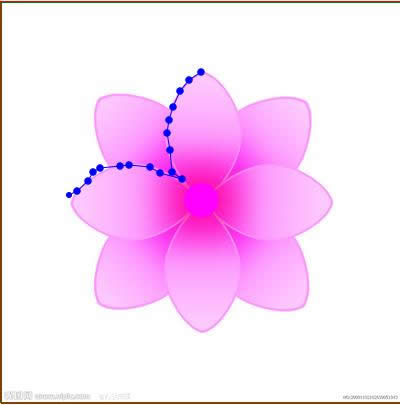
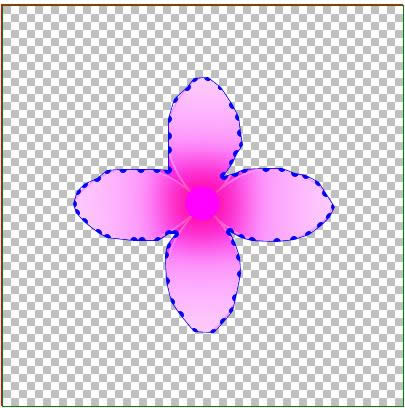
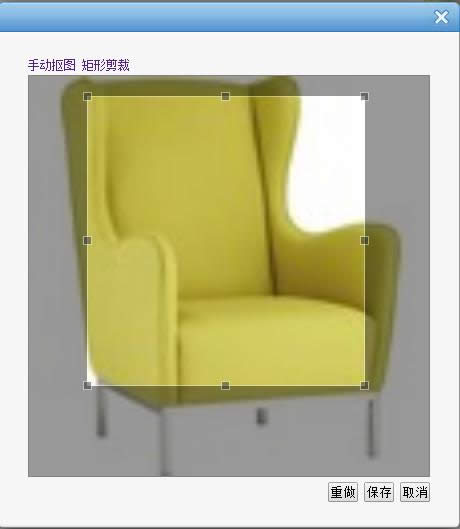
導讀Adobe Photoshop,簡稱“PS”,是由Adobe Systems開發和發行的圖像處理軟件。Photoshop主要處理以像素所構成的數字圖像。使用其眾多的編修與繪圖工具,可以有效地進行圖片... Adobe Photoshop,簡稱“PS”,是由Adobe Systems開發和發行的圖像處理軟件。Photoshop主要處理以像素所構成的數字圖像。使用其眾多的編修與繪圖工具,可以有效地進行圖片編輯工作。ps有很多功能,在圖像、圖形、文字、視頻、出版等各方面都有涉及。 html5 canvas+js實現ps鋼筆摳圖1. 項目要求需要用js實現photoshop中鋼筆摳圖功能,就用了近三四天的時間去解決它,最終還是基本上把他實現了。 做的過程中走了不少彎路,最終一同事找到了canvans以比較核心的屬性globalCompositeOperation = "destination-out", 屬性可以實現通過由多個點構成的閉合區間設置成透明色穿透畫布背景色或是背景圖片,這樣省了許多事。 2.實現效果: 鼠標點完之后會將所有的點連成閉合區間,并可自由拖拉任一點,當形成閉合區間后,可在任意兩點之間添加新點進行拖拉。
3.實現思路: 設置兩層p,底層設置圖片,頂層設置canvas畫布(如果將圖片渲染到畫布上,摳圖時會閃爍,所以至于底層),在畫布上監視 鼠標事件反復渲染點及之間連線,形成閉合區間后將整體畫布渲染小塊背景圖片,并將閉合區間渲染透明色。并把點的相對畫布 坐標記錄或更新到數組中去。截完圖后,將點的坐標集合傳回后臺,由后臺代碼實現根據坐標點及圖片寬度高度實現截圖,并設 至背景色為透明色(canvas也可以實現截圖,但需要處理像素點實現背景透明,暫時還沒實現,計劃用C#后臺代碼實現)。 4.js(寫的不規范比較亂,大家就當參考吧) <script type="text/javascript">
$(function () {
var a = new tailorImg();
a.iniData();
});
//
var tailorImg=function()
{
this.iniData = function () {
//畫布
this.can.id = "canvas";
this.can.w = 400;
this.can.h = 400;
this.can.roundr = 7;
this.can.roundrr = 3;
this.can.curPointIndex = 0;
this.can.imgBack.src = "gzf.png";
this.can.canvas = document.getElementById(this.can.id).getContext("2d");
//圖片
this.img.w = 400;
this.img.h = 400;
this.img.image.src = "flower.jpg";
//加載事件:
//初始化事件:
var a = this;
var p = a.can.pointList;
$("#" + a.can.id).mousemove(function (e) {
if (a.can.paint) {//是不是按下了鼠標
if (p.length > 0) {
a.equalStartPoint(p[p.length - 1].pointx, p[p.length - 1].pointy);
}
a.roundIn(e.offsetX, e.offsetY);
}
//判斷是否在直線上
//光標移動到線的附近如果是閉合的需要重新劃線,并畫上新添加的點
a.AddNewNode(e.offsetX, e.offsetY);
});
$("#" + a.can.id).mousedown(function (e) {
a.can.paint = true;
//點擊判斷是否需要在線上插入新的節點:
if (a.can.tempPointList.length > 0) {
a.can.pointList.splice(a.can.tempPointList[1].pointx, 0, new a.point(a.can.tempPointList[0].pointx, a.can.tempPointList[0].pointy));
//清空臨時數組
a.can.tempPointList.length = 0;
}
});
$("#" + a.can.id).mouseup(function (e) {
//拖動結束
a.can.paint = false;
//拖動結束;
if (a.can.juPull) {
a.can.juPull = false;
a.can.curPointIndex = 0;
//驗證摳圖是否閉合:閉合,讓結束點=開始點;添加標記
a.equalStartPoint(p[p.length - 1].pointx, p[p.length - 1].pointy);
//判斷是否閉合:
if (a.can.IsClose) {
}
}
else {
//如果閉合:禁止添加新的點;
if (!a.can.IsClose) {//沒有閉合
p.push(new a.point(e.offsetX, e.offsetY));
//驗證摳圖是否閉合:閉合,讓結束點=開始點;添加標記
a.equalStartPoint(p[p.length - 1].pointx, p[p.length - 1].pointy);
//判斷是否閉合:
//重新畫;
if (p.length > 1) {
a.drawLine(p[p.length - 2].pointx, p[p.length - 2].pointy, p[p.length - 1].pointx, p[p.length - 1].pointy);
a.drawArc(p[p.length - 1].pointx, p[p.length - 1].pointy);
} else {
a.drawArc(p[p.length - 1].pointx, p[p.length - 1].pointy);
}
}
else {
//閉合
}
}
//驗證是否填充背景:
if (a.can.IsClose) {
a.fillBackColor();
a.drawAllLine();
}
});
$("#" + a.can.id).mouseleave(function (e) {
a.can.paint = false;
});
//鼠標點擊事件:
$("#" + a.can.id).click(function (e) {
//空
});
}
this.point = function (x, y) {
this.pointx = x;
this.pointy = y;
};
//圖片
this.img = {
image:new Image(),
id: "",
w:0,
h:0
};
//畫布;
this.can = {
canvas:new Object(),
id: "",
w: 0,
h: 0,
//坐標點集合
pointList: new Array(),
//臨時存儲坐標點
tempPointList: new Array(),
//圓點的觸發半徑:
roundr: 7,
//圓點的顯示半徑:
roundrr: 7,
//當前拖動點的索引值;
curPointIndex : 0,
//判斷是否點擊拖動
paint : false,
//判斷是否點圓點拖動,并瞬間離開,是否拖動點;
juPull : false,
//判斷是否閉合
IsClose: false,
imgBack: new Image()
};
//函數:
//更新畫線
this.drawAllLine=function () {
for (var i = 0; i < this.can.pointList.length - 1; i++) {
//畫線
var p = this.can.pointList;
this.drawLine(p[i].pointx, p[i].pointy, p[i + 1].pointx, p[i + 1].pointy);
//畫圈
this.drawArc(p[i].pointx, p[i].pointy);
if (i == this.can.pointList.length - 2) {
this.drawArc(p[i+1].pointx, p[i+1].pointy);
}
}
}
//畫線
this.drawLine = function (startX, startY, endX, endY) {
//var grd = this.can.canvas.createLinearGradient(0, 0,2,0); //坐標,長寬
//grd.addColorStop(0, "black"); //起點顏色
//grd.addColorStop(1, "white");
//this.can.canvas.strokeStyle = grd;
this.can.canvas.strokeStyle = "blue"
this.can.canvas.lineWidth =1;
this.can.canvas.moveTo(startX, startY);
this.can.canvas.lineTo(endX, endY);
this.can.canvas.stroke();
}
//畫圈:
this.drawArc=function(x, y) {
this.can.canvas.fillStyle = "blue";
this.can.canvas.beginPath();
this.can.canvas.arc(x, y,this.can.roundrr, 360, Math.PI * 2, true);
this.can.canvas.closePath();
this.can.canvas.fill();
}
//光標移到線上畫大圈:
this.drawArcBig = function (x, y) {
this.can.canvas.fillStyle = "blue";
this.can.canvas.beginPath();
this.can.canvas.arc(x, y, this.can.roundr+2, 360, Math.PI * 2, true);
this.can.canvas.closePath();
this.can.canvas.fill();
}
//渲染圖片往畫布上
this.showImg=function() {
this.img.image.onload = function () {
this.can.canvas.drawImage(this.img.image, 0, 0, this.img.w,this.img.h);
};
}
//填充背景色
this.fillBackColor = function () {
for (var i = 0; i <this.img.w; i += 96) {
for (var j = 0; j <= this.img.h; j += 96) {
this.can.canvas.drawImage(this.can.imgBack, i, j, 96, 96);
}
}
this.can.canvas.globalCompositeOperation = "destination-out";
this.can.canvas.beginPath();
for (var i = 0; i <this.can.pointList.length; i++) {
this.can.canvas.lineTo(this.can.pointList[i].pointx,this.can.pointList[i].pointy);
}
this.can.canvas.closePath();
this.can.canvas.fill();
this.can.canvas.globalCompositeOperation = "destination-over";
this.drawAllLine();
}
//去掉pointlist最后一個坐標點:
this.clearLastPoint=function () {
this.can.pointList.pop();
//重畫:
this.clearCan();
this.drawAllLine();
}
//判斷結束點是否與起始點重合;
this.equalStartPoint = function (x,y) {
var p = this.can.pointList;
if (p.length > 1 && Math.abs((x - p[0].pointx) * (x - p[0].pointx)) + Math.abs((y - p[0].pointy) * (y - p[0].pointy)) <= this.can.roundr * this.can.roundr) {
//如果閉合
this.can.IsClose = true;
p[p.length - 1].pointx = p[0].pointx;
p[p.length - 1].pointy = p[0].pointy;
}
else {
this.can.IsClose = false;
}
}
//清空畫布
this.clearCan=function (){
this.can.canvas.clearRect(0, 0, this.can.w, this.can.h);
}
//剪切區域
this.CreateClipArea=function () {
this.showImg();
this.can.canvas.beginPath();
for (var i = 0; i <this.can.pointList.length; i++) {
this.can.canvas.lineTo(this.can.pointList[i].pointx,this.can.pointList[i].pointy);
}
this.can.canvas.closePath();
this.can.canvas.clip();
}
//
this.CreateClipImg=function()
{
}
//判斷鼠標點是不是在圓的內部:
this.roundIn = function (x, y) {
//剛開始拖動
var p = this.can.pointList;
if (!this.can.juPull) {
for (var i = 0; i < p.length; i++) {
if (Math.abs((x - p[i].pointx) * (x - p[i].pointx)) + Math.abs((y - p[i].pointy) * (y - p[i].pointy)) <= this.can.roundr * this.can.roundr) {
//說明點擊圓點拖動了;
this.can.juPull = true;//拖動
//
this.can.curPointIndex = i;
p[i].pointx = x;
p[i].pointy = y;
//重畫:
this.clearCan();
//showImg();
if (this.can.IsClose) {
this.fillBackColor();
}
this.drawAllLine();
return;
}
}
}
else {//拖動中
p[this.can.curPointIndex].pointx = x;
p[this.can.curPointIndex].pointy = y;
//重畫:
this.clearCan();
if (this.can.IsClose) {
this.fillBackColor();
}
this.drawAllLine();
}
};
//光標移到線上,臨時數組添加新的節點:
this.AddNewNode=function(newx, newy) {
//如果閉合
var ii=0;
if (this.can.IsClose) {
//判斷光標點是否在線上:
var p = this.can.pointList;
for (var i = 0; i < p.length - 1; i++) {
//計算a點和b點的斜率
var k = (p[i + 1].pointy - p[i].pointy) / (p[i + 1].pointx - p[i].pointx);
var b = p[i].pointy - k * p[i].pointx;
//if (parseInt((p[i + 1].pointy - p[i].pointy) / (p[i + 1].pointx - p[i].pointx)) ==parseInt((p[i + 1].pointy - newy) / (p[i + 1].pointx - newx)) && newx*2-p[i+1].pointx-p[i].pointx<0 && newy*2-p[i+1].pointy-p[i].pointy<0) {
// //如果在直線上
// alert("在直線上");
//}
$("#txtone").val(parseInt(k * newx + b));
$("#txttwo").val(parseInt(newy));
if (parseInt(k * newx + b) == parseInt(newy) && (newx - p[i + 1].pointx) * (newx - p[i].pointx) <= 2 && (newy - p[i + 1].pointy) * (newy - p[i].pointy) <= 2) {
//
//parseInt(k * newx + b) == parseInt(newy)
//添加臨時點:
this.can.tempPointList[0] = new this.point(newx, newy);//新的坐標點
this.can.tempPointList[1] = new this.point(i+1, i+1);//需要往pointlist中插入新點的索引;
i++;
//alert();
//光標移動到線的附近如果是閉合的需要重新劃線,并畫上新添加的點;
if (this.can.tempPointList.length > 0) {
//重畫:
this.clearCan();
//showImg();
if (this.can.IsClose) {
this.fillBackColor();
}
this.drawAllLine();
this.drawArcBig(this.can.tempPointList[0].pointx, this.can.tempPointList[0].pointy);
return;
}
return;
}
else {
// $("#Text1").val("");
}
}
if (ii == 0) {
if (this.can.tempPointList.length > 0) {
//清空臨時數組;
this.can.tempPointList.length = 0;
//重畫:
this.clearCan();
//showImg();
if (this.can.IsClose) {
this.fillBackColor();
}
this.drawAllLine();
//this.drawArc(this.can.tempPointList[0].pointx, this.can.tempPointList[0].pointy);
}
}
}
else {
//防止計算誤差引起的添加點,當閉合后,瞬間移動起始點,可能會插入一個點到臨時數組,當再次執行時,
//就會在非閉合情況下插入該點,所以,時刻監視:
if (this.can.tempPointList.length > 0) {
this.can.tempPointList.length = 0;
}
}
}
};
</script><style type="text/css">
.canvasDiv {
position: relative;
border: 1px solid red;
height: 400px;
width: 400px;
top: 50px;
left: 100px;
z-index: 0;
}
img {
width: 400px;
height: 400px;
z-index: 1;
position: absolute;
}
#canvas {
position: absolute;
border: 1px solid green;
z-index: 2;
}
.btnCollection {
margin-left: 100px;
}
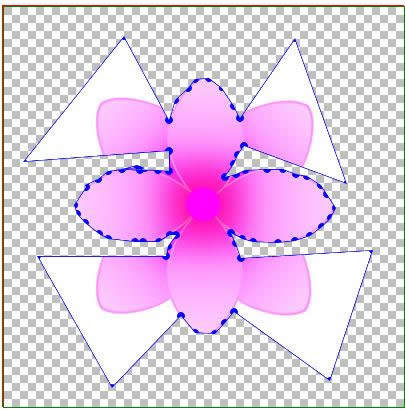
</style><div class="canvasDiv"> <img src="flower.jpg" /> <canvas id="canvas" width="400" height="400" style="border: 1px solid green;"></canvas> </div> 總結: 不足:當光標移動到線上時,判斷一點是否在兩點連成的直線上計算方法不正確,應該計算為一點是否在兩點圓兩條外切線所圍成的矩形 內;鋼筆點應為替換為小的p方格比較合理,像下面的矩形摳圖;(思路:將存取的點坐標集合和動態添加的小p方格建立對應關系 當拖動小方格時,觸發事件更新坐標點集合,并重新渲染)。 6.這只是js鋼筆摳圖的一種解決方案,項目中現在這塊還在改進,如果大家有好的方法或是資料的話,希望能分享一下。謝謝 更多html5 canvas+js實現ps鋼筆摳圖相關文章請關注PHP中文網! Photoshop默認保存的文件格式,可以保留所有有圖層、色版、通道、蒙版、路徑、未柵格化文字以及圖層樣式等。 |
溫馨提示:喜歡本站的話,請收藏一下本站!
本站發布的Win7純凈版系統、Win10純凈版和XP純凈版系統僅為個人學習測試使用,請在下載后24小時內刪除,不得用于任何商業用途,否則后果自負,請支持購買微軟正版軟件!
本站所有資源全部來自于網絡資源,如侵犯到您的權益,請及時通知我們(peng896066052@126.com),我們會及時處理.
Copyright © 2018-2020 雨林木風下載站